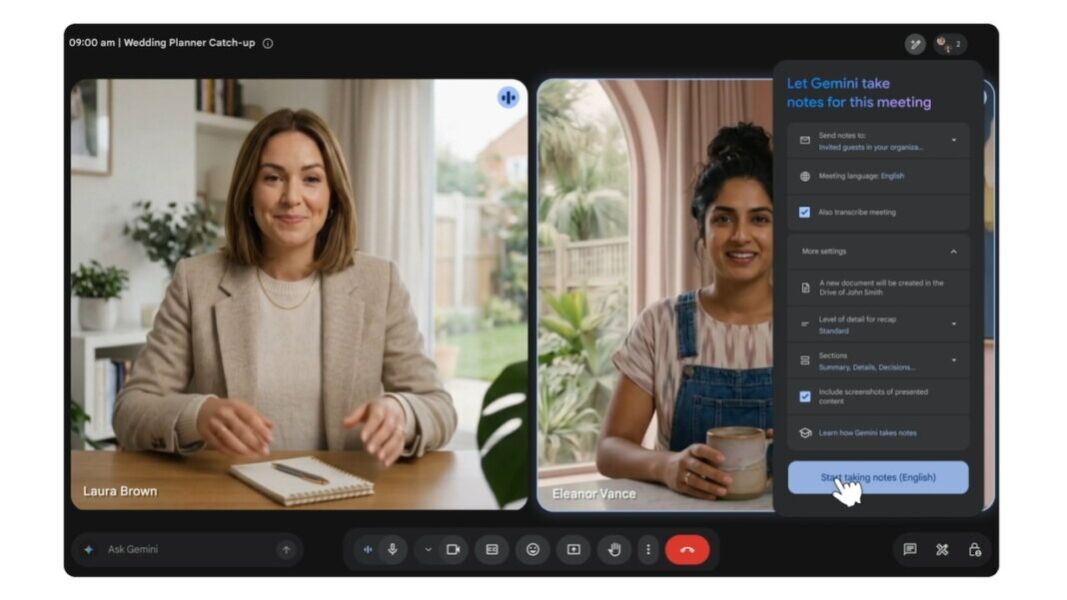
- Meet Rollout: Take notes for me now sits in Google Meet’s paid Google AI Pro and Ultra lane.
- Notes Workflow: The feature transcribes calls, creates summaries and action items, saves Google Docs files, and sends recap emails.
- Use Limits: Google lists eight supported languages, one spoken language at a time, consent controls, and 15-minute-to-eight-hour meeting guidance.
- Market Context: Teams and Zoom already have recap features, so Google Meet notes have to prove routine reliability.
In Google Meet’s paid artificial intelligence lane, Gemini-powered Take notes for me is now the note-taking option for Google AI Pro and Ultra subscribers. Free Meet accounts remain outside the rollout. The change turns Meet into a fuller meeting-record tool for users already paying for Google’s AI plans.
Inside Meet, the workflow produces transcripts and summaries with action items when Take notes for me is enabled.
How Gemini Turns Meetings Into Notes
Activation of Gemini note-taking sits inside live calls through the pencil icon or in Google Meet’s Meeting records controls for later meetings. Project reviews, client calls, and decision sessions will benefit directly from such a written trail while short calls for status checks or less important topics may not justify storing an AI-generated note-record.
Recurring meetings add another usage-choice, providing a default setting that saves setup time. Instead of manual note-taking for decisions after a call, a host gets one Drive file and one recap email. Teams can share the file afterwards as needed. They can correct it. They can fold it into a task list.

Manual corrections will however remain part of the workflow because a recap can miss nuance, assign an action to the wrong person, or flatten a discussion into a shorter summary.
The usefulness will depend on whether the AI generated note output is accurate enough to become the first draft of follow-up work. Project teams will get value only when the recap shortens the handoff between the meeting and the written record. Client-facing calls will require the same caution because an inaccurate summary can also turn into wrong decisions of even higher impact.
Project leads will still have to choose which action items matter, and participants will still need an opportunity to dispute such AI generated records. The recaps will mainly reduce transcription labor.
Controls, Languages, and Meeting Limits
Participant notices appear when Gemini note-taking is active, and Workspace administrators may require explicit consent before note-taking, recording, or transcription features start. For Google Workspace work and school accounts, those controls determine whether the output becomes a stored Drive file and an email recap, not just an on-screen convenience. Personal subscribers face fewer organizational controls, but managed users remain bound by recording and transcription rules set by their institutions.
The feature currently supports eight languages: English, French, German, Italian, Japanese, Korean, Portuguese, and Spanish. Because Gemini handles one spoken language at a time, a bilingual meeting can still require manual cleanup if participants switch languages. As a result, multilingual teams will still need a human review step. Without that review, a mixed-language recap can miss who agreed to which action.
Google says sessions from 15 minutes to eight hours sit inside the intended supported range, making it valuable for both for very short check-ins and longer meetings. Overall, structured planning calls will fit the feature better than just quick calls for coordination as thin meetings rarely need a formal record.
Where Google Fits Against Teams and Zoom
Take notes for me dates back to 2024. Earlier availability tied generated summaries to Calendar events and the organizer’s Drive, making the current expansion less a new workflow than a shift in who can activate it. Paid individual access just changes the activation lane, not the workflow itself.
Rival collaboration platform Microsoft Teams reached broad Intelligent Meeting Recap availability already in 2023. Zoom later made AI Companion part of its own collaboration push.