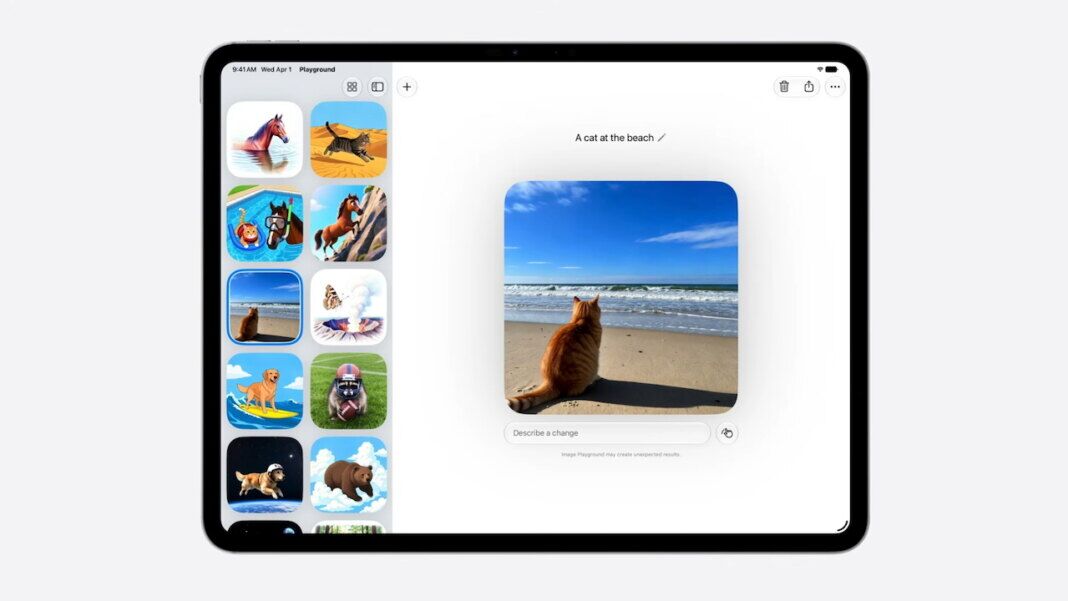
- Feature Rollout: Apple’s iOS 27 test build adds realistic Image Playground generation for developers.
- Editing Workflow: Users can create prompt images and revise selected areas with touch or natural-language controls.
- Safety Controls: Private Cloud Compute handles heavier generation, while hidden SynthID watermarks mark output as AI-generated.
- Access Window: A public beta is planned for July, with fall availability and daily server-backed usage limits.
Apple released developer testing for iOS 27 Apple Intelligence features, answering iOS 27 Image Playground expectations as Image Playground’s earlier Animation, Illustration, and Sketch baseline gives way to native realistic AI pictures. For Image Playground, Apple’s image-generation app, the update moves toward prompt-made images that can look closer to photographs.
Image Playground now sits inside Apple’s next major iPhone operating-system update, iOS 27, as part of Apple Intelligence. Users get text-to-image generation, meaning AI creates a new image from a written prompt, but broad access still waits for a public beta in July and a fall 2026 rollout.
Apple’s privacy-focused cloud processing system for heavier AI tasks, Private Cloud Compute, runs the new model. Generated images carry hidden SynthID watermarks that can mark media as AI-generated, and some server-backed image features have daily usage limits with more access through many of Apple’s paid iCloud+ subscription plans.
How Realistic Image Playground Works
Image Playground can now create realistic images from text prompts while staying inside Apple’s device experience rather than becoming a standalone web image generator. Practical use cases include Messages, Lock Screen wallpapers, Contact Posters, invitations, flyers, and website images.
Editing gives the update its strongest everyday use case. Users can modify generated images by describing changes in natural language or by tapping, circling, or brushing objects to move and resize them. One control example lets someone tap one image area and describe the change with a prompt, turning generation into an iterative workspace rather than a one-shot request.
Prompt workflow remains simple enough for non-specialists. A sample “a realistic image of a stork” request shows the basic entry point, but users can also generate birthday scenes, adjust outfits, change background objects, or move design elements without starting from scratch.
Server dependence keeps the rollout from becoming an unlimited-generation promise. iCloud+ subscribers get increased access, while other users may run into daily limits sooner.
Capacity controls will matter alongside image quality. Everyday use depends on how often the server-backed tools are available when users want to make invitations, wallpapers, or personal-photo edits.
Why the Upgrade Is a Catch-Up Move
Before Apple’s Worldwide Developers Conference, Image Playground’s expected iOS 27 upgrade centered on changing the app’s earlier creative limits. Animation, Illustration, and Sketch modes made Image Playground better suited to playful graphics than realistic photographs or presentation-ready visuals.
Apple is now changing the range of work the app can plausibly handle, not just adding another style. The move brings Image Playground closer to realistic prompt-based tools that users already see elsewhere.
Adobe’s shipping of a Firefly image-generation tool, Midjourney image, Stability AI’s Stable Image model family, OpenAI’s ChatGPT image generator and Google’s Imagen and Nano Banana models have made realistic prompt-based output a normal expectation. Rival tools have also raised the bar with character consistency, aspect-ratio controls, and conversational editing rather than only prettier first drafts.
Image Playground enters that mature category with device integration, privacy processing, and workflow controls as its main differentiators. Apple’s advantage, if the beta works, is not raw model access alone. It is the ability to generate and edit images inside the same device surfaces where users already build messages, lock screens, contact posters, and lightweight design material.
Apple is also joining a wider AI-image provenance effort. OpenAI’s adoption of SynthID watermarking shows how hidden labels are becoming part of AI-image distribution, and Apple is applying the same kind of invisible marker to Image Playground output.
C2PA metadata and hidden watermark signals are designed to help provenance travel with generated media after users share it. Apple’s watermark will not settle every detection problem, but it gives the company’s own system a built-in label for generated media.
What Users Can Test Next
Developers now get the first test window, while ordinary users wait for the public beta of iOS 27 and the fall release. July’s beta will show whether realistic output and editing controls work reliably outside Apple’s launch-stage examples.
Fall availability will decide when ordinary users can judge the feature in daily use. Image Playground still has to deliver useful results, predictable server access, and clear AI-generated-media labeling often enough for everyday creative work.