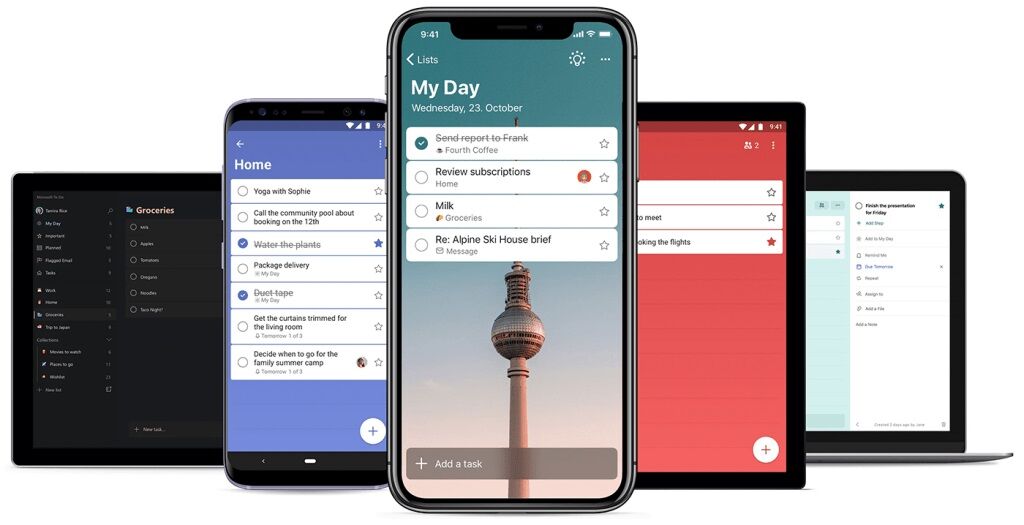
- App Retirement: Microsoft will retire its To Do task apps on June 30, 2027, leaving personal-account users to find another app.
- Work and School Accounts: Planner can show existing To Do tasks only through the cutoff and will save new tasks users set for themselves.
- Data Export: Microsoft plans to let users export To Do data before the cutoff and has yet to say what they can save.
Microsoft will retire its To Do apps on June 30, 2027, taking away the task manager people use to keep the same lists and reminders across phones and computers. Microsoft is steering people who use a work or school account for To Do toward Planner, its team task manager. People who use a personal Microsoft account for To Do will need another app, even if they pay for Microsoft 365 Personal or Family.
Microsoft set the date on November 18 during Ignite. The cutoff covers Windows, Mac, iOS, Android and the web. To Do has been popular among users to sync recurring tasks across PCs and phones.
What Happens to To Do Tasks
Using Microsoft Planner with a work or school account depends on the organization’s Microsoft 365 subscription, the user’s license and whether an administrator has enabled the app. Planner already lets eligible users track assignments. Starting in December 2026, Microsoft will roll out an updated My Tasks view, where employees and students can create and star tasks they set for themselves and see assignments in a separate view. Planner will save new private tasks in a plan for each user. That puts individual work and team projects on the same system, which Microsoft says will help it offer more consistent features for both.
For people with Microsoft Planner access, June 30, 2027, is the last day they can see or manage existing To Do tasks there. Microsoft won’t copy those tasks or lists into the new Planner plan.
Microsoft has no plans to replace To Do’s Windows or Mac apps with native Planner versions. The browser and Microsoft Teams versions lack equivalent offline access on desktop. Shared To Do lists won’t carry their members, assignments or permissions into Planner. To Do users can pick a reminder time for an individual task. Planner offers notifications tied to task due dates.
What Stays Connected After June
Microsoft will keep the To Do service running after the apps close. Scripts and other tools that read tasks through the To Do API can continue using that connection. Microsoft has yet to announce the separate retirement dates for the service, its software connections and its synchronization support. Closing the apps does not itself trigger deletion of existing tasks.
With the feature enabled, flagging mail in a primary Microsoft mailbox can currently create a To Do task with a link back to the message. In a follow-up statement, Microsoft product director Howard Crow said the company would update its Outlook and Teams integrations to work with Planner. Microsoft has yet to say whether flagging a message will put it on a Planner list.
Classic Outlook has its own built-in Tasks feature. Those tasks will keep syncing with Exchange, Microsoft’s mail service, after the To Do apps close.
Where Users Can Take Their Lists
Many users came to To Do from Wunderlist, the task app Microsoft closed in 2020 after choosing To Do as its replacement. Brad Silverberg, a former Microsoft executive who led Windows 95 development commented about the change that he still uses To Do daily and is considering TickTick and Todoist as replacement.
I’m a long time user of Microsoft To Do and before that, Wunderlist (as a 3rd party app and then part of msft). I use it daily. Very disappointed now.
The closest two apps I’ve found are TickTick and Todoist. I hope they offer ToDo import soon. https://t.co/ykF9YqpKTn
— Brad Silverberg (@bradsilverberg) November 20, 2026
Crow acknowledged the impact of the retirement on personal accounts and said To Do customers would be able to export their data before the apps retire. Microsoft has yet to specify which parts of a list people can save, what format they’ll get or whether other apps will be able to read it.
TickTick has advertised a To Do import in its browser app. Which parts of a list it can transfer remains unclear.
Microsoft To Do is retiring.
If you’re moving from Microsoft To Do and have chosen TickTick, here’s a quick way to bring your existing tasks over:
On the TickTick web app, go to
Profile → Settings → Integrations & Import → Import pic.twitter.com/WvZIjNrLUQ— TickTick (@ticktickteam) November 20, 2026
Superlist, announced by Wunderlist founder Christian Reber in 2020, calls its tool an importer. Its To Do integration links to a user’s Microsoft account and keeps selected lists in sync, including due dates and completion status. A task added to a linked list in either app appears in the other. Superlist’s guidance leaves open what happens to the synced lists once the To Do service ends.
We built the natural successor. Superlist comes from the makers of Wunderlist, and our Microsoft To Do importer is ready today.
Move your lists in a few clicks and get 50% off for Black Friday: https://t.co/AuL5cWPvLd https://t.co/Q5Ox1FHLN4— Superlist (@Superlist) November 19, 2026
Todoist’s importer makes a one-time copy of selected lists using read-only access to the user’s To Do lists, then disconnects from Microsoft. The importer is available on the free plan and skips reminders and attachments that exceed the destination plan’s limits. If Todoist can’t match a recurring task’s schedule, it copies the task as a one-time item. It doesn’t invite the people who shared the original lists.