- Shared Sessions: Microsoft Copilot SDK 2.0 lets apps run AI agents for multiple users without starting a separate computing environment for every conversation.
- Tool Access: Apps can limit each session to approved tools and send commands or file work to an isolated environment.
- Session Recovery: An app can reopen a session with its history after a restart or from another machine with access to the saved state.
Microsoft released Copilot SDK 2.0 at Ignite on November 17, letting developers run AI assistants for multiple users from one running copy of the agent software. A customer-service app, for example, can give each conversation access only to the signed-in customer’s orders.
The toolkit gives apps access to the runtime, the software behind GitHub Copilot that coordinates calls to AI models and tools. The SDK became generally available in June under the GitHub Copilot SDK name. Version 2.0 runs the software inside the app’s own process by default. The earlier SDK launched a separate process for it. In the older Microsoft setup that used one container per conversation, even a simple request had to wait for that isolated environment to start.
Where an Agent Can Act
In the SDK’s restricted mode for shared services, a session starts without access to the host’s command line or files. The app chooses which tools to give it and can pass the user’s GitHub credentials for that session. In the customer-service example, the app still has to verify who is asking and which orders its lookup tool may return.
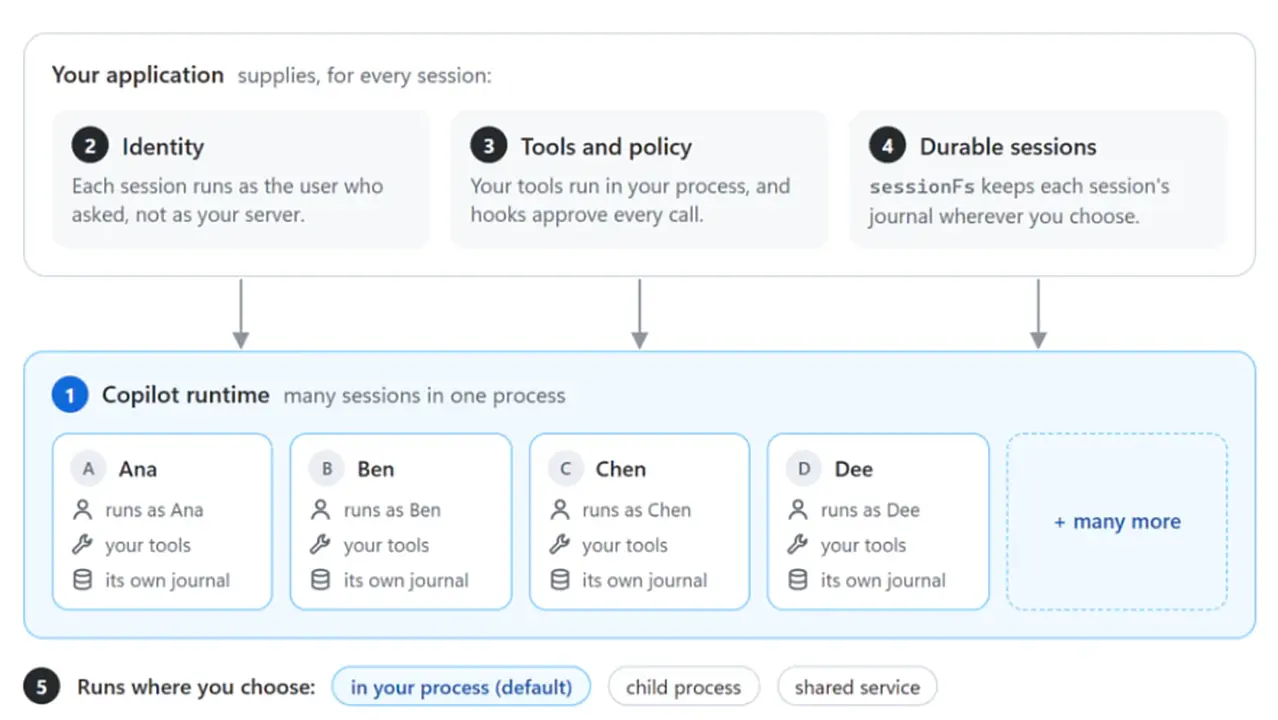
An agent that needs to run commands or edit files can do that work in a sandbox, an isolated computing environment. The software that calls the model can stay in the shared process. An app can also start a conversation with shared tools and move the session into its own sandbox when the task needs commands or files. The move is one-way and keeps the conversation history. The app waits while the sandbox starts. For work that needs to compile code or run an untrusted script from the outset, Microsoft still recommends a container boundary.
Runtime Performance in Microsoft’s Test
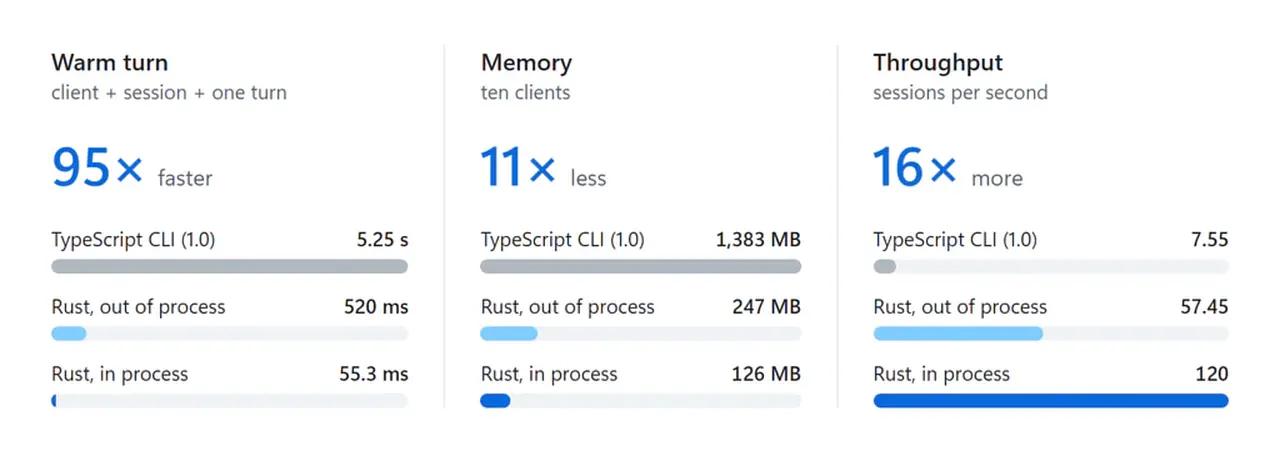
Microsoft tested the TypeScript command-line runtime against the in-app Rust runtime on the same workload after a warm-up. The test created a client to connect to the runtime, opened a session and completed one turn. The Rust version took 55.3 milliseconds, compared with 5.25 seconds for TypeScript. Microsoft also reported that ten clients used 126 MB of memory in the new setup, down from 1,383 MB in the earlier one.
What Survives a Restart
The runtime records a session’s messages, tool calls and results. Another instance of an app can resume the conversation after a restart or disconnect if it can read that record. OpenAI’s Codex SDK, introduced in October 2025 to embed its coding agent, also lets TypeScript applications resume a local coding conversation.
With Copilot SDK 2.0, developers can keep the records on the runtime’s disk or choose storage under their own control. In a shared service, the app has to check who can reopen each session. If two sessions share the same permission records, an approval saved in one can carry over to the other. The app has to keep those records separate for users who need separate permissions.
Who Runs the Agent Software
Application developers can get Copilot SDK 2.0 for TypeScript, Python, Go, .NET, Java and Rust. They can authenticate with supported GitHub credentials or supply their own model provider’s key. Developers can keep the runtime in a separate process or operate it as a shared service that several instances of an app connect to.
Microsoft’s managed Copilot option in Foundry is in public preview. In supported regions, developers can select it for new prompt agents, which they configure with instructions and a compatible deployed model. Microsoft then runs the agent software and supplies the sandbox for commands and file work.