- Dot Launch: OpenAI is gradually rolling out Dots to eligible paid ChatGPT users, giving them an assistant that carries tasks between conversations.
- Plan Access: Pro excludes the European Economic Area, Switzerland and UK; Enterprise needs admin activation, and eligible accounts may wait days for a Dot.
- Muse Comparison: Meta’s Muse also works across connected apps; independent tests saw it finish errands and hand some steps back to users.
- Action Control: Users choose app access and action rules; OpenAI says Dots check actions that affect accounts and return sensitive steps to users.
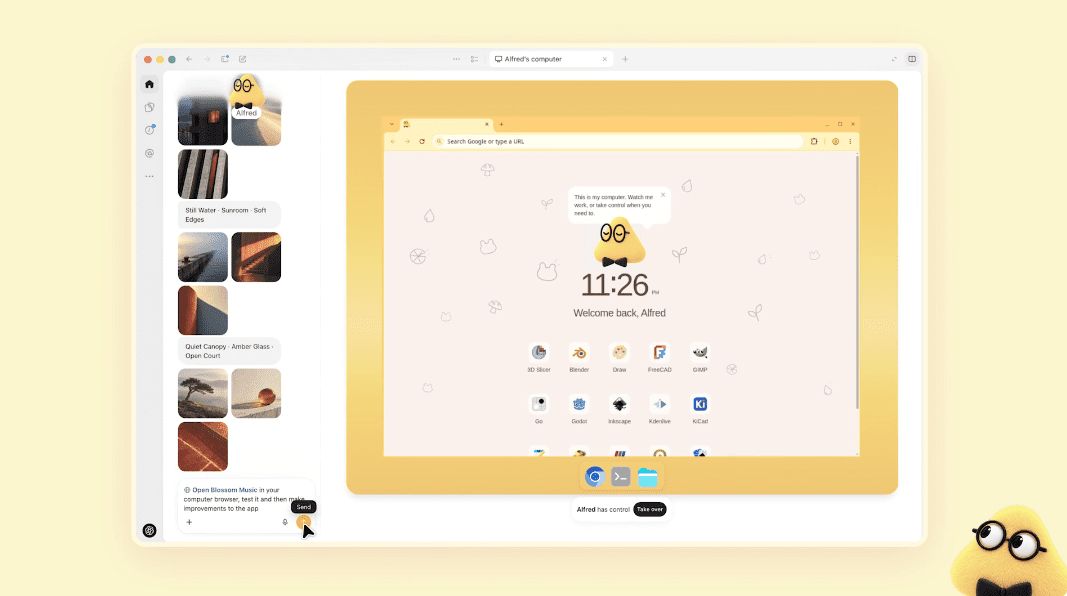
OpenAI has started rolling out Dots, which represent persistent AI assistants that can keep working after a ChatGPT conversation ends. For eligible paid users, a Dot can carry an assignment on its own cloud computer and through connected apps, send progress updates, and return for decisions or approvals.
A Persistent Assistant With Its Own Computer
For work in a user’s apps, a Dot can draw only on services the user connects from a plugin catalogue that OpenAI says supports more than 4,000 apps. It uses its own cloud computer and browser to pursue an assignment, keeps the task’s context when a conversation ends, and sends updates or questions as the work continues. The user can pick up that same assignment in ChatGPT, Slack or Microsoft Teams, or call the Dot through ChatGPT.
Introducing dots, powered by GPT-6 Astra.
Remarkably capable, always-on agents built to handle everything. pic.twitter.com/inY5BZj3Kz
— OpenAI (@OpenAI) September 29, 2026
In one OpenAI example, a developer could ask a Dot to monitor customer feedback for recurring requests, build and test a change to an app, and return proposed code changes with a video for review.
OpenAI’s earlier ChatGPT Agent could already use a virtual computer and connectors for multistep work. Dots place that kind of tool use inside one assistant that retains context between assignments and conversations.
Meta Muse Shows the Existing Alternative
Meta’s Muse personal agent also runs in a cloud computer, uses a browser and connected services, and keeps working after its app closes. It can ask before sending an email or making a purchase. Meta says it is available in the US and Canada and added small-business connectors on September 29, bringing business accounts and outside tools into the same agent.
Muse cleared promotional email and completed an approved purchase in one independent test by The Verge. In another, it drafted a landscaper email that the tester sent, but could not finish a home-security plan change because that required a phone call. Dots’ real-world performance on comparable tasks remains unknown.
Access Begins With Paid Plans
The Dots rollout is gradual, so eligibility does not mean a Dot has appeared in every account. ChatGPT Pro access excludes the European Economic Area, Switzerland and the UK. Business Premium users can receive Dots in supported ChatGPT regions. Enterprise access is a beta that a workspace administrator must enable; it is off by default. Users under 18 are excluded.
An eligible user can create one Dot on ChatGPT’s desktop web interface or desktop app. Mobile messaging follows only when that channel becomes available to the account. OpenAI plans additional Dots, while specialist versions for organizations are in a limited pilot.
The first Dot is included in eligible plans. At its September 29, 2026 launch, OpenAI said Dot usage would not count toward eligible plan allowances for the next month. Later per-plan terms are still to be shared. Work handed to ChatGPT Work or Codex continues to count under those products’ usual limits.
Connected Work Depends on Permission
Users can set rules that allow, block or require approval for specified actions. OpenAI says a Dot checks steps that could affect accounts or share information against those rules and hands the most sensitive actions back to the user. When researching proactively, it can read connected information but cannot send messages, change connected content or control a browser; any later action follows the user’s rules and OpenAI’s safety checks.
Individual Dot memories cannot be viewed, edited or selectively deleted. Disconnecting an app stops new access but leaves information it already obtained in the Dot’s context.