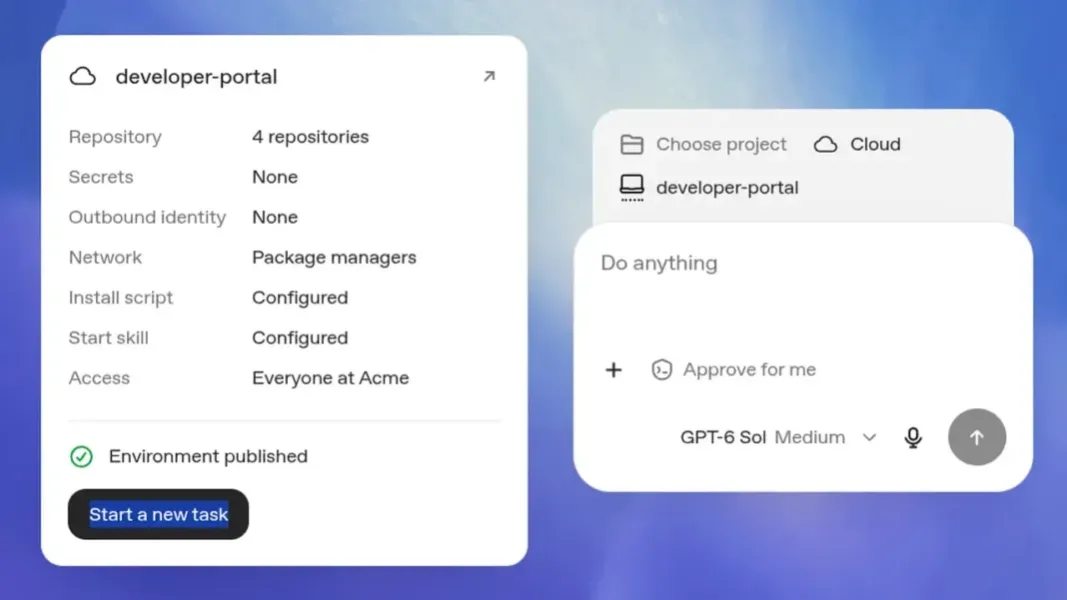
- Reusable Setup: OpenAI Codex now lets developers publish a prepared GitHub project setup and reuse it for separate cloud coding tasks.
- Task Continuity: Each task keeps its own uncommitted work, which developers can reopen on web or mobile while their computer sleeps.
- Cloud Access: Developers need Codex cloud access and a connected GitHub repository; Enterprise workspaces separately control shared setup management.
- Task Recovery: Default saved task virtual machines can be recovered for up to seven days after the last turn or resumption.
OpenAI has introduced reusable cloud setups for Codex, its AI coding agent. Developers can start separate tasks from the same prepared project and resume a task from another device while the work runs in the cloud. It supplies each new task with a starting point; the task then keeps its own files and uncommitted changes when the developer returns on web or mobile.
One Setup, Separate Coding Tasks
With Codex cloud, a developer prepares an environment from a GitHub repository on the web or desktop. Codex can inspect the project and install or test dependencies and tools. The developer supplies any missing service access, reviews the setup and publishes it so later cloud tasks begin with the prepared files and tools.

For example, a developer can start a bug investigation from the published setup, leave the computer asleep and review that task’s changes from a phone. The same task retains its uncommitted files and installed tools when reopened. A second task starts from the published setup in its own workspace; the unfinished bug fix stays in the first task. Republishing a changed setup affects new tasks while existing ones keep their working state.
What Changed From Earlier Codex
Codex already ran repository-backed coding tasks in isolated cloud containers. Its legacy cloud guide describes a setup script and container caching for up to 12 hours, including follow-up work, as we covered back in 2025.
Cross-device control also predates this release. Codex in the ChatGPT mobile app let a developer supervise work running on a connected laptop or other host. The new cloud workflow runs the task in a Codex-managed environment and lets the developer resume it from another device without keeping that local machine awake.
How Cursor Compares
Cursor Cloud Agents already offers cloud coding tasks in separate virtual machines, saved project setup and access from a browser, iOS or desktop client. Both products therefore support work that continues away from a local computer. Their documented functions differ for some projects: Cursor supports GitLab repositories and agent browser or computer use, while the new Codex Cloud environments currently use GitHub and do not support those functions.
Access and Working Limits
A developer needs Codex cloud access and a connected GitHub repository with the necessary permissions to create and use a setup. In Enterprise, the ability to use Codex in the cloud and manage shared environments is controlled separately. Members with cloud access can create personal environments, while managing setups shared across the workspace requires another permission that is off by default. Each member’s repository rights still apply to a shared setup; some connected services may ask for personal access values.
Self-hosted GitHub Enterprise Server remains unsupported in the new cloud environments. External network destinations must be allowed, and protected services may require credentials supplied by the environment or user. A default saved task virtual machine can be recovered for up to seven days after its last turn or resumption. Developers need to commit work they want to keep beyond that window.