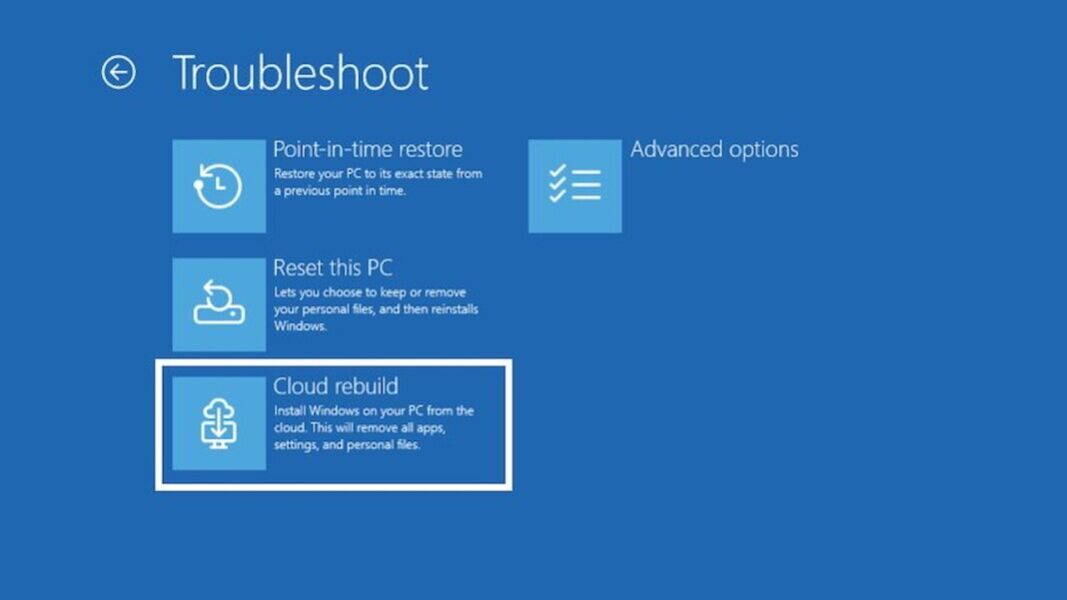
- Preview Only: Microsoft is testing a Cloud rebuild feature in the Windows 11 Insider Experimental channel; it is not a broad Windows 11 rollout.
- Clean Reinstall: The feature starts from Windows Recovery Environment and downloads both the Windows image and device drivers from Windows Update.
- Data Loss: Cloud rebuild reformats the system disk, removing local files, apps, accounts, and settings.
- IT Limitation: Remote initiation through Intune or another endpoint-management tool is planned for a later Windows build, not available in this preview.
Microsoft is testing Cloud rebuild, a new Windows 11 recovery option that can reinstall the operating system even when a PC will not boot. The feature appears in Windows 11 Insider Experimental Preview Build 26300.8772, released on July 6, and is also listed under Cloud Recovery in Microsoft’s July 6 Insider roundup.
The important distinction is that Cloud rebuild is not a normal Windows reset. Instead of relying on the installed copy of Windows, a local recovery image, a recovery partition, or USB installation media, the feature starts from Windows Recovery Environment and downloads both the target Windows image and the device’s drivers from Windows Update.
That makes Cloud rebuild useful for a specific failure case: a Windows 11 device that cannot boot but can still reach the recovery environment and connect to the internet. The tradeoff is significant. Cloud rebuild performs a clean reinstall, reformats the system disk, and removes locally stored files, apps, accounts, and settings.
What Cloud Rebuild Changes
Microsoft has been moving more Windows recovery work toward cloud-assisted repair and reinstall paths for several years. Earlier examples include cloud-download restore ideas for Windows, fixes around a Windows reset file-retention bug, and more recent work on cloud rollback for bad drivers. Cloud rebuild extends that direction, but with a more drastic purpose: it is designed to reinstall Windows from recovery when the installed operating system cannot do the job.
Unlike repair-oriented recovery features, Cloud rebuild is closer to a factory-style clean reinstall delivered through Windows Update. It is meant to bring the device back to a known-good Windows 11 state, not preserve the existing local installation.
How Cloud Rebuild Works
Cloud rebuild starts from Windows Recovery Environment, the recovery interface that can load when Windows itself fails to start. In the preview, users can launch it from the recovery menu by selecting Troubleshoot, then Recovery and uninstall, then Cloud rebuild. Microsoft’s Cloud rebuild documentation also says local administrators can start the preview from an elevated command prompt where that entry point is supported.
Once the process starts, the device must connect to the internet from inside Windows Recovery Environment. Ethernet can connect automatically, while Wi-Fi requires a supported personal password-protected network. Cloud rebuild then contacts Windows Update to determine the target Windows build and download the files needed for the reinstall.
Before the reinstall begins, the user reviews the target Windows build, edition, and language. The final confirmation step is the data-loss warning. Only after that warning is accepted does Cloud rebuild begin preparing, downloading, and installing Windows.
What Gets Erased
Cloud rebuild reformats the system disk. That removes locally stored files, accounts, apps, and settings from the Windows installation being rebuilt.
Files stored only in cloud services such as OneDrive are not erased from the cloud, but any local-only files on the affected disk are at risk. Users should treat Cloud rebuild as a destructive recovery option and confirm that important data is backed up before continuing.
Preview Limits and Requirements
Cloud rebuild is currently a preview feature for non-production testing. It requires Windows 11, a healthy Windows Recovery Environment, internet access from that recovery environment, compatible networking support from the device maker, and hardware that meets Windows 11 requirements.
Microsoft also lists two practical failure cases. Error code 0x800704C6 points to missing network connectivity. Error code 0xc1900200 can indicate that the device does not meet Windows 11 hardware requirements or that a required driver is not available.
Why You should Watch It
For IT administrators, Cloud rebuild is less about replacing one USB recovery stick and more about reducing hands-on recovery work when a remote or damaged Windows device cannot boot. Microsoft’s Quick Machine Recovery targets serious startup failures through cloud-based remediation. Cloud rebuild addresses a different scenario: when the practical answer is a full reinstall.
The enterprise promise is not complete yet. Remote initiation through Microsoft Intune or another endpoint-management solution is planned for a later Windows build, so administrators cannot currently use this preview to trigger rebuilds across a managed fleet.
That limitation matters for organizations already invested in endpoint management, including those using Microsoft Intune Suite’s endpoint features. In the current preview, the missing piece is not what happens after the wipe. It is the ability to start the rebuild remotely in the first place.
After Cloud rebuild completes, the device enters the Windows out-of-box experience. Managed devices can then reconnect to Intune, receive assigned apps and policies, restore user settings, and make OneDrive files available after sign-in. In practice, a rebuilt company laptop may still need Autopilot enrollment, policy redeployment, application installation, user sign-in, and cloud-file sync before it is ready for work again.
For now, Cloud rebuild is best understood as a destructive local recovery option for Insider testing. Its larger enterprise value will depend on the later remote-management support Microsoft has not yet shipped.