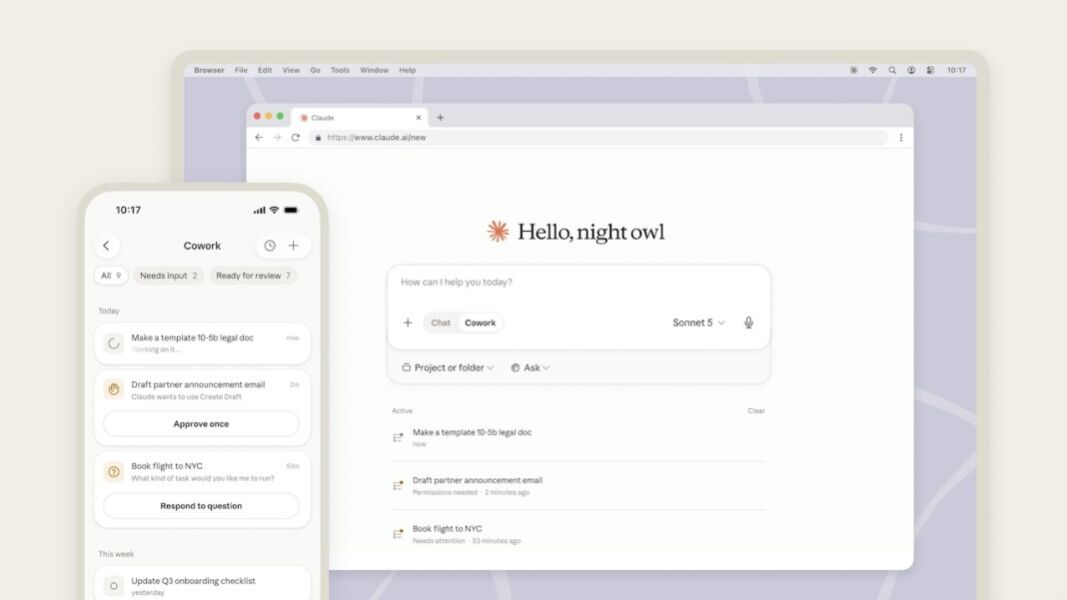
- Web And Mobile Rollout: Anthropic has started rolling out Claude Cowork beta access on web and mobile, starting with Max users.
- Remote Sessions: Cowork tasks can continue across devices, letting users check progress, resume sessions, and approve next steps from a phone or browser.
- Desktop Caveat: The Claude desktop app remains the full Cowork environment for local files, local connectors, browser use, and computer control.
- Workplace Signal: Anthropic’s sampled usage data shows Cowork activity concentrated in business operations and content work, not only software development.
Anthropic has started rolling out Claude Cowork on web and mobile, expanding its delegated-work assistant beyond the desktop app where it first launched. The beta is starting with Max users from July 7, with broader plan access expected over the next several weeks.
The update changes how Cowork fits into a workday. Users can start a task on one device, let it continue remotely, check progress from a phone or browser, approve next steps, and return to the output later. That makes Cowork less dependent on a single desktop session, even though the desktop app remains central for work that needs access to local files, local connectors, browser use, or computer control.
The practical distinction is access versus full capability. Web and mobile make Cowork easier to monitor, steer, and resume. The desktop app remains the full environment for deeper automation that reaches resources on the user’s computer.
What Changes In Claude Cowork
Cowork was initially released as a desktop-centered agent for delegated work, building on Anthropic’s earlier file-editing and file-manipulation features. Anthropic later expanded that direction with desktop control and Dispatch, reinforcing the desktop app as Cowork’s strongest environment for local automation.
The new rollout adds a remote layer on top of that foundation. According to Anthropic’s Cowork platform guidance, users can start, steer, review, and resume Cowork tasks across desktop, web, and mobile. Connectors, skills, plugins, scheduled tasks, Projects, and file previews are also available across surfaces.
| Capability | Desktop app | Web and mobile |
|---|---|---|
| Start, steer, review, and resume Cowork tasks | Supported | Supported |
| Use connectors, skills, plugins, scheduled tasks, and Projects | Supported | Supported |
| Preview files created by Claude | Supported | Supported |
| Use local files and local connectors | Full support | Works through the desktop app while it is open |
| Use browser access and computer control | Full support | Works through the desktop app while it is open |
That limitation is important. A remote session can keep running after the desktop app closes, but it cannot continue reaching local files on that computer once the app is no longer open. For lightweight task review, web and mobile may be enough. For file-heavy or browser-driven work, desktop remains the main Cowork surface.
Why Cross-Device Access Matters
Delegated work often does not fit into one sitting. A user might ask Cowork to prepare a client briefing, organize notes into a deck, reconcile a spreadsheet, or draft follow-up emails. With remote sessions, that work can continue while the user moves between meetings, devices, or locations.
The mobile and web rollout therefore makes Cowork more like a cross-device work queue than a desktop-only assistant. Users can check whether a task is still running, redirect it, approve a sensitive step, or review the completed output without returning to the original machine.
Approval is not just a convenience feature. Cowork can work with workplace context such as files, calendars, email, messaging tools, browser actions, and connected services. As those workflows move across devices, clear human review becomes one of the main controls that prevents an agent from acting too broadly or too soon.
Usage Data Points Beyond Coding
Anthropic had already pushed Cowork toward workplace use through 13 Model Context Protocol connectors. Its own Claude Cowork usage analysis points in the same direction.
Anthropic sampled 1.2 million anonymized and aggregated Cowork sessions from more than 600,000 organizations between May 11 and May 31, 2026. The company says the data was classified into 20 categories of work using an automated system. It also cautions that the figures are shares of sampled sessions, not total Cowork usage volume.
In that sample, business process and operations accounted for 33.4% of Cowork usage. Content creation and copywriting followed at 16.4%, while software development represented 8.7%.
Those figures help explain why web and mobile access matter. Cowork is not being used only as a coding assistant. Much of the sampled activity involves administrative processes, documents, presentations, reports, and repeatable knowledge-work tasks — workflows where users often need to review, approve, and hand off work rather than sit through one uninterrupted desktop session.
Competition For Delegated Work
Anthropic’s rollout lands as major AI vendors compete to control the surface where office work is assigned, tracked, reviewed, and completed. Microsoft made Copilot Cowork generally available in June, positioning it around long-running, multi-tool tasks inside Microsoft 365.
Claude Cowork’s pitch is different. Anthropic is extending Cowork across Claude’s desktop, web, and mobile surfaces while preserving the desktop app as the bridge to local files and computer-level actions. That gives users more flexibility, but it also makes the desktop dependency a key test for the product.
For early users, Anthropic is also extending doubled Cowork usage limits through August 5. The question is whether web and mobile access turns Cowork into a daily work surface, or whether those surfaces mainly become a notification and approval layer for tasks that still depend on the desktop app.