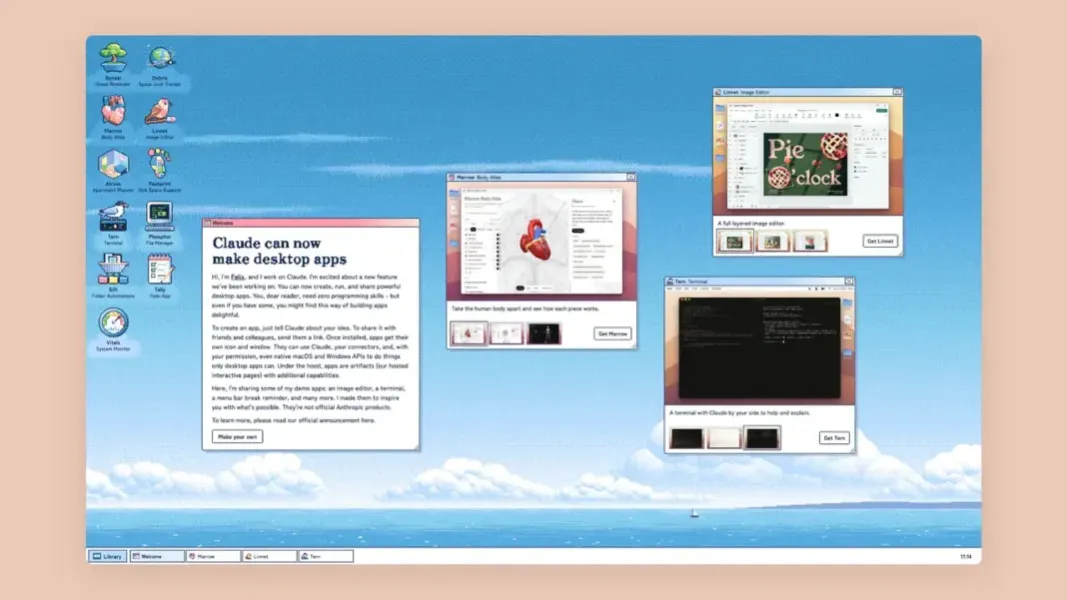
- Desktop Apps: Claude’s Mac and Windows beta lets users install interactive tools they build in the AI assistant.
- Computer Access: Installed tools can request notifications, while running programs or changing files requires a grant of full computer access.
- Claude Plans: The beta is rolling out across Claude’s plans, including Free, with separate controls for organizations.
Anthropic started rolling out a beta on November 24 that lets people install tools they build in Claude as Mac and Windows apps. A timer or dashboard can open from its own icon outside the AI assistant’s chat window. The app picks up edits to the original tool automatically.
You can now install Claude artifacts as desktop apps on Mac and Windows.
Ask Claude to build an artifact, click “Install as app”, and open it like any other app. It can use your connectors and, if you allow it, send notifications or add a menu bar item. pic.twitter.com/8CBgqe5OKq
— ClaudeDevs (@ClaudeDevs) November 24, 2026
From Claude Chat to the Desktop
Claude calls the work it creates alongside a conversation artifacts. In June 2025, Anthropic gave users a way to build and share AI-powered apps inside Claude. Users could describe an app and refine it in chat. Eligible artifacts get an Install as app option. Once installed, they can open from the Claude Apps folder on macOS or the Start menu on Windows.
A browser shortcut can also put a tool within one click. With desktop installation and the user’s permission, a timer can put an item in the Mac menu bar and keep counting after its window closes. It can ask for a separate permission to send a notification when time is up.
On supported plans, apps can keep using Claude’s connectors, which link the tool to services such as Google Calendar. A meeting-prep app can pull in appointments from a connected calendar whether it opens beside the chat or in its own window.
Felix Rieseberg, who works on Claude at Anthropic, described using it to make his own file manager.
I’ve been using it to build my own versions of terminals, file managers, video editors, comms tools, and even little desktop pets.
These apps can do native things, like adding menu bar items, creating transparent windows, or sending notifications.
Update to the latest version…
— Felix Rieseberg (@felixrieseberg) November 24, 2026
OpenAI’s ChatGPT Sites builds websites from a prompt. Site authors can preview edits before publishing them to the live web address. When an editor changes a shared Claude artifact, Claude updates the apps others have installed from it.
What Apps Can Do with Permission
An installed app starts with the access it would have in a browser. It can ask to respond to keyboard shortcuts while another app is active or float above other windows. With full computer access, it can run programs and read, change or delete files without asking before each action.
On personal plans, users can grant full access to apps they made themselves. Team and Enterprise users can also grant it to apps made within their organization if their organization allows it. Claude generally blocks full-access requests when it cannot identify an author or a contributor is outside the permitted group. Anthropic says it does not review apps before people install them.
An approval lasts for one version of the artifact. After an edit, Claude asks the app’s user again about the permissions they granted. A refusal stays in place until the user changes it. Code the app loads from another website can change without triggering a new request.
Turning off full access stops programs the app started if they are still tied to it. File changes the app already made stay in place.
If an owner stops sharing an artifact with someone, the recipient can lose access to the installed app. When that happens, Claude stops the programs the app started. This can take up to about 20 minutes, or longer if Claude cannot check who has access.
Where the Beta Is Available
The beta requires Claude Desktop version 6.28899.0 or later. Team accounts start with installation on and full computer access off. Enterprise owners have to enable installation for their organization.
Organizations using Claude under what Anthropic calls a hybrid deployment cannot turn desktop installation on. The beta also excludes organizations with Claude Enterprise’s HIPAA-ready setup for handling protected health information.
Installation also excludes artifacts made in Claude chat before September 16, 2026, and those made from templates such as Docs, Slides and Sheets.
Even an installed app needs an internet connection to open. It also needs a signed-in Claude Desktop session. Building an app and any requests it sends to Claude count toward the user’s plan limits.