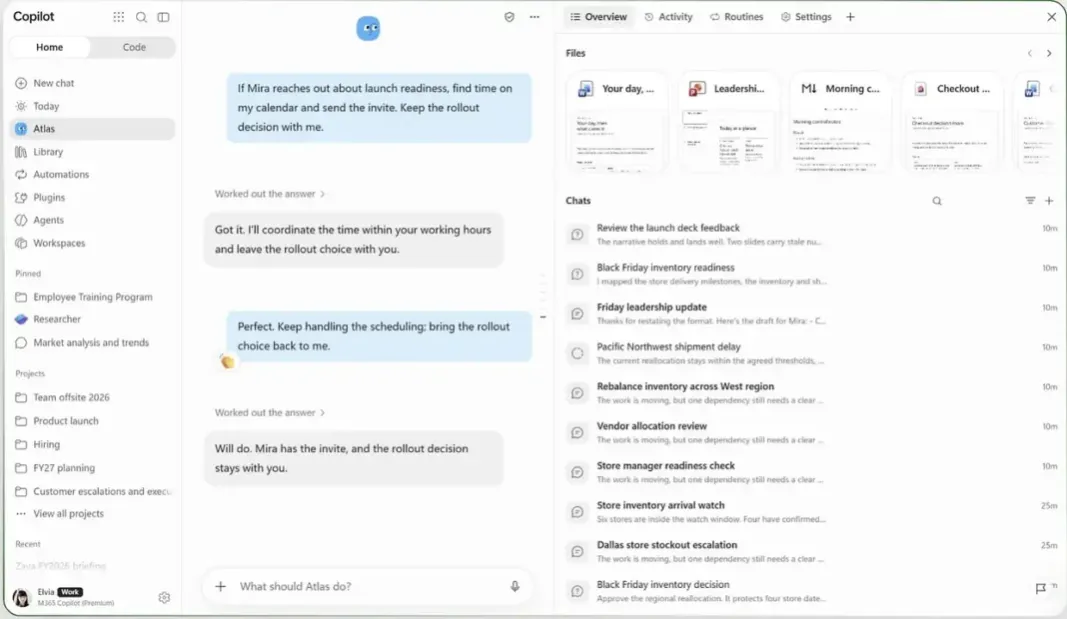
- Work Delegation: The Autopilot preview lets eligible Microsoft 365 Copilot users hand off work in Teams and Outlook.
- Recurring Work: Autopilot can run scheduled assignments on its own cloud computer, even with its owner’s laptop closed.
- Preview Access: Eligible U.S. organizations in Microsoft’s early-access program get the first chance to enable the agent.
Microsoft started rolling out Autopilot on November 17, letting eligible organizations turn on a new AI assistant for Microsoft 365 Copilot users. Coworkers can message the assistant in Teams to ask for a meeting. It can use its owner’s scheduling preferences to find a time. The owner sets the rules for when Autopilot needs approval.
How Autopilot Handles Delegated Work
A worker gives the agent a name and a goal in the Copilot app. At setup, Autopilot draws on the previous 30 days of work email, meetings, chats and files the worker can already access. With its own work identity, the agent can email a summary to its owner, who can reply with follow-up instructions. The owner can also bring it into a Teams group chat and give it an assignment there.
Microsoft executive Omar Shahine described how his agent cleared time for travel. He chose meetings to take off his calendar and the agent removed those occurrences while keeping the recurring series. When Shahine asked for help with unanswered Teams conversations, it prepared 40 draft replies and sorted them by priority. The replies stayed in a private queue for Shahine to review and decide which to send.
Shahine also said he sent Autopilot transcribed voice notes from his phone in Teams to track travel expenses.
Everyone should have an assistant at work! Soon you can!
Sebastian (my Autopilot) is already tracking all my expenses for #MSIgnite travel.
I have set up the Action Button on my iPhone to record a voice note, transcribe it and send it to Sebastian in Teams and he writes it… pic.twitter.com/mL4ZbcFDh4
— Omar Shahine (@OmarShahine) November 16, 2026
A company’s IT administrators can limit the agent’s access or block it altogether. Autopilot’s actions are logged under its own name, so security staff can see what it did. But Microsoft has yet to demonstrate how well permission limits and approval rules prevent unwanted actions or the disclosure of sensitive data.
How Autopilot Fits Into Copilot
Microsoft introduced the agent as Scout in June, when select customers could try the experimental desktop version. In September, Microsoft then first described a cloud-hosted version called Autopilot. The November rollout widens access through a public preview in Microsoft’s Frontier early-access program.
Copilot Cowork already handles long-running assignments across Microsoft 365 apps under the signed-in user’s permissions. An employee can hand Cowork a specific job, such as preparing a briefing. With Autopilot, the employee can make that briefing a standing assignment and have the agent send it every week.
Who Can Enable Autopilot
Microsoft is starting the rollout with eligible U.S. customers. The worker assigned the agent needs a Microsoft 365 Copilot license. Administrators must enable access and set up usage-based billing through Copilot Credits. The preview also requires Microsoft Agent 365 tools for managing agent costs.
Administrators can track credit usage and set budgets. Microsoft plans to disclose final prices and how it will sell Autopilot before general availability.