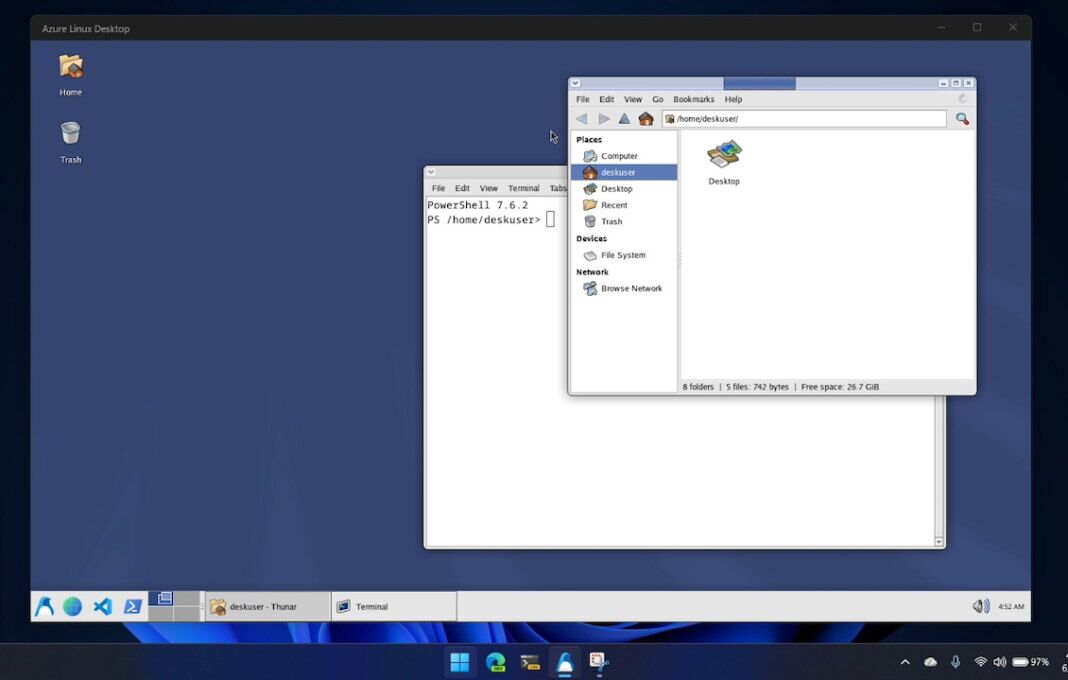
- Prototype Demo: Hayden Barnes built Azure Linux Desktop as an experimental Windows app that boots an Azure Linux 4.0 desktop.
- Display Path: The app uses Microsoft’s wslc container layer, XFCE, XRDP, and Remote Desktop Protocol plumbing to show the session.
- Production Caveat: Unstable WSL builds and Fedora package workarounds keep the project outside supported Microsoft desktop Linux territory.
- Developer Context: Microsoft’s WSL container plan targets more manageable Linux-container workflows for Windows developers and administrators.
Author and project developer Hayden Barnes has built Azure Linux Desktop as an experimental Windows app that boots a full Azure Linux desktop inside a window. Barnes’s June 6 prototype puts Microsoft’s Fedora-derived Azure Linux 4.0 under the lightweight XFCE desktop environment, but he set the boundary plainly: “It is a toy.”
The demo gives Windows Subsystem for Linux developers a GUI test case. An embedded wslc container runs Azure Linux 4.0, and XFCE presents the Linux session inside Windows while the project stays outside supported Microsoft desktop Linux territory.
How the Windows-Hosted Linux Desktop Works
Azure Linux Desktop is a .NET 10-based WinUI 3 app that starts an embedded wslc container based on Azure Linux 4.0 and boots into XFCE. Wslc provides the Windows-side container layer for Linux containers, while XFCE supplies the visible Linux desktop that appears after launch.
Inside the app window, the prototype combines wslc, WinUI Reactor, Azure Linux 4.0, .NET 10, Windows App SDK packaging, and the Windows Remote Desktop Protocol ActiveX control. Azure Linux Desktop starts an XRDP server inside the container, connects over loopback, and places the Windows RDP client over the app window after the Linux session is ready.
The remote-desktop path makes the Linux session look native while a borderless WinForms host keeps the display outside the WinUI tree. Practical features such as working audio and GPU acceleration, copy-and-paste support, dynamic resizing, VS Code, and PowerShell make the demo more complete than its prototype status would suggest.
Microsoft has placed WSL containers in its Build 2026 Windows developer plan, with a command-line interface and application programming interface for Linux containers on Windows. Microsoft’s broader Windows Subsystem for Linux lets Windows users run Linux command-line tools without a traditional virtual machine or dual-boot setup, while the planned container layer extends that model to Open Container Initiative-style workloads.
Barnes uses the unfinished wslc layer to give Azure Linux a graphical session before the CLI and API path reaches ordinary WSL users. Microsoft’s plan also frames WSL containers as a way to reduce third-party tooling overhead while giving administrators policy controls and visibility over Linux containers on developer machines.
For enterprise developers, the preview matters because it moves Linux-container work closer to managed Windows tooling instead of separate desktop-container products.
Why the Prototype Is Not a Product Launch
Azure Linux 4.0 remains a server and cloud distribution, not a desktop operating system. Azure Linux 4 uses RPM packaging, Fedora-derived sources, and targeted overlays for Azure workloads rather than a graphical workstation role.
Version 4.0 is available for Azure Virtual Machines, VM Scale Sets, and container images, with AKS and WSL support planned to follow. That split makes the demo interesting as Windows plumbing, not as a sign that Azure Linux is becoming a workstation distribution.
Workarounds define the desktop layer. Azure Linux 4.0 lacks desktop and graphical user interface packages, so the project relies on Fedora 43 package lineage to pull XFCE from Fedora repositories. Developers also need unstable WSL from main, Fedora desktop packages added to a server-oriented base, and an early source build of a WinUI experiment.
Microsoft made WSL source availability a real community-development path in 2025, but this demo still depends on unfinished components rather than a regular Windows update. Azure Linux Desktop remains a one-off experiment with no expectation of ongoing maintenance.
Docker Desktop, Podman Desktop, and OrbStack ship desktop-container workflows for development teams, while Barnes’s app targets a narrower Azure Linux desktop experiment inside Windows. Docker Desktop provides a desktop container development environment, Podman Desktop covers containers and Kubernetes across major operating systems, and OrbStack targets macOS users who want Docker-compatible workflows and Linux machines.
Barnes’s prototype instead tests whether Windows-hosted container and remote-desktop plumbing can present a Linux desktop convincingly. Microsoft said at Build 2026 that WSL containers will reach public preview through a regular WSL update.
Stable WSL support will decide the prototype’s practical reach. Without that container base, Barnes’s server-focused Azure Linux desktop remains an unsupported toy demo.