- New Features: Google Chrome 145 adds Split View, PDF annotation tools, and a Save to Google Drive button to its desktop browser.
- Productivity Focus: The update lets users view two tabs side by side, highlight and annotate PDFs, and upload files to Drive without leaving the browser.
- Competitive Context: Chrome holds 76.39% of the worldwide desktop browser market and is accelerating feature development as AI-native browser challengers enter the market.
- Coming Soon: Google is also preparing native vertical tabs for Chrome, with early access currently available via experimental flags ahead of a stable release.
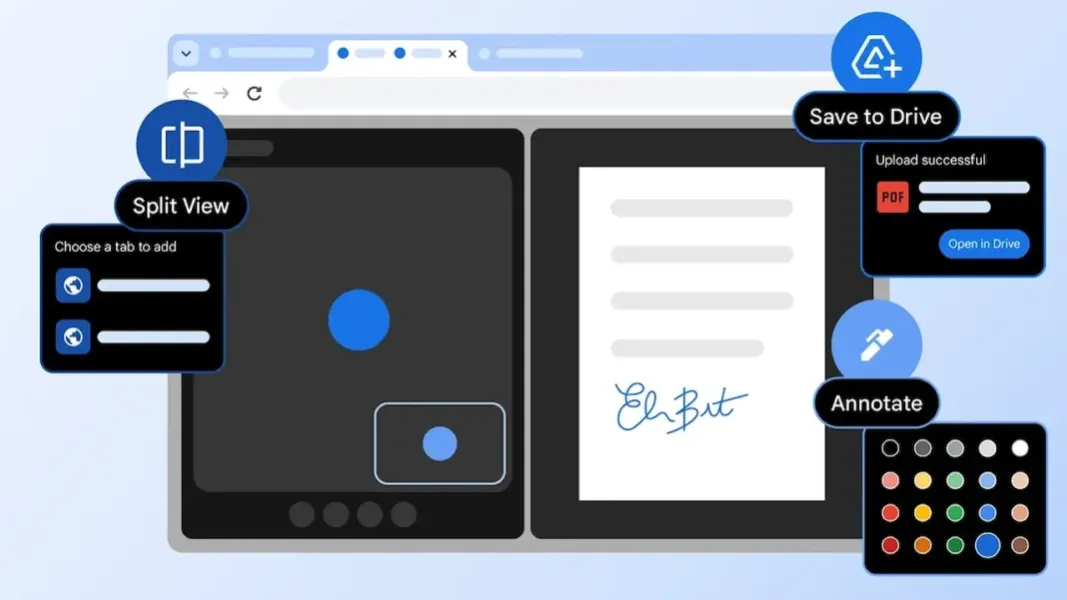
Google Chrome has added three new productivity features to its desktop browser: Split View, PDF annotation, and Save to Google Drive.
Google announced the update on February 19, 2026, with all three features available as of Chrome 145. The changes keep common workflow tasks inside the browser, reducing the need to switch between apps for document management and multitasking.
How Split View Works
Split View lets you view two tabs side by side in a single, organized space, reducing back-and-forth tab fatigue. The feature launches by right-clicking a link and selecting Open Link in Split View. Alternatively, users can drag a tab to the browser edge to open the split pane, or right-click a tab in the tab bar and choose Add Tab to New Split View, then pick a second tab or search result to fill it.
According to the Chrome team, early testers found it helps multitask and get more done on the web. “Our work with early testers has shown that split view is already helping people multitask and get more done on the web,” the Chrome team wrote. The feature had already been accessible to some users ahead of the broader release when the formal announcement was made.
PDF Annotation Tools
Beyond tab management, Chrome also closes a long-standing gap in its PDF viewer. The viewer now includes annotation tools for highlighting and notes directly in the browser, removing the need for a standalone PDF editor. Users can select text to highlight it in a chosen color, add margin notes, insert signatures, and adjust annotation size, all within the existing viewer interface.
The capability covers markup, signatures, and document review workflows that previously required exporting files to a third-party application. Thurrott noted that PDF annotation was a top-requested Chrome feature, already available in Microsoft Edge and other browsers for some time. Chrome’s release notes for version 145 list the feature under user productivity and apps.
Save to Google Drive
Building on the PDF enhancements, Chrome now also lets users send annotated files directly to cloud storage. There is also a new “Save to Google Drive” button next to the Download button in Chrome’s PDF viewer. Clicking it uploads the file directly to the user’s Google Drive account, placing it in a dedicated Saved from Chrome folder for easy retrieval.
The feature eliminates the manual steps of opening Drive, navigating to a folder, and uploading, keeping files organized for Google account users rather than scattered across a local Downloads directory. All three features have been rolling out for some time and should be widely available as of Chrome 145 today.
Taken together, the PDF annotation and Drive save capabilities position Chrome as a lightweight document workflow hub, reducing the dependency on standalone apps like Adobe Acrobat for everyday markup and filing tasks.
Market Context
Chrome’s update arrives at a competitive moment. According to StatCounter’s January 2026 desktop market data, Chrome holds 76.39% of the worldwide desktop browser market, based on over five billion monthly page views, more than eight times the share of its nearest rival.
According to the same StatCounter data, the next-largest desktop browsers are Edge at 9.14%, Safari at 5.29%, and Firefox at 4.05%.
These so-called browser wars have pushed Google to be less stagnant in developing consumer-facing features, including non-AI workflow improvements as AI-native browser challengers enter the market. The same week, Microsoft released Edge version 145 with new Copilot PDF actions and read-aloud improvements, signaling that both companies are accelerating browser feature development on parallel tracks.
What’s Coming Next
Chrome’s productivity buildout does not stop with this release. The browser is preparing native vertical tabs with early access already available via experimental flags, and vertical tabs are set to arrive in an upcoming stable release. Once available, vertical tabs would give users a third layout option alongside the current horizontal tab bar and Split View. The additions indicate a continued effort to modernize Chrome’s native tab management without requiring users to install third-party extensions or switch to a competing browser.