- Public Beta: Adobe has opened Creative Cloud AI Assistant public beta access across major Creative Cloud apps, while After Effects stays private.
- Workflow Automation: The assistants can organize media, clean layers, check layouts, and guide production steps from natural-language prompts.
- Creative Control: Adobe says users keep taste and final decisions, but pricing, enterprise controls, regions, and beta duration remain undefined.
Adobe has opened Creative Cloud AI Assistant public beta access across Photoshop, Premiere, Illustrator, InDesign, and Frame.io, while After Effects remains in private beta. Creative Cloud is Adobe’s suite of creative apps, and the assistant is an app-specific workflow helper rather than a claim that AI is replacing creative professionals.
Powered by Adobe’s creative agent, an AI system designed to coordinate a sequence of creative production tasks, the assistant can orchestrate multi-step workflows inside individual applications. Users can ask software to organize source material, clean up layers, prepare layouts, and guide production work, moving the product value from a single generated image toward the steps between an idea and a finished asset.
With the launch, the assistant also gets a learning role. It can help users learn Adobe applications while it executes creative tasks. David Wadhwani, Adobe’s creativity head, says people remain in control of taste, expertise, and judgment, keeping the vision and final decisions with users.
What the Assistants Can Do in Each App
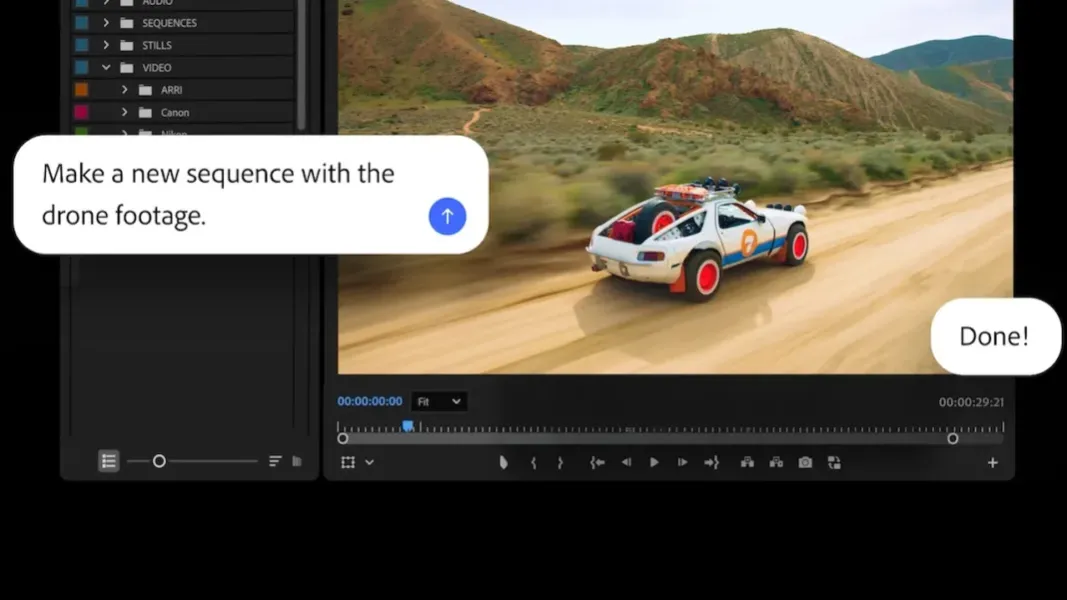
Premiere gets the clearest example of the assistant. Itcan import source media, handle sorting assets into bins, batch renaming clips, identify interview questions in recorded speech, place timeline markers, and assemble a working starting point for a video project. Editors still make the cut, but the assistant can take over some of the project organization that happens before a sequence is ready.
Photoshop’s version handles natural-language instructions for asset cleanup and composition management. A user can ask for background changes, layer organization, resizing for online platforms, or batch background removal. Compared with single-command image generation, the stronger workflow promise is that the assistant can move through several routine production steps while the user checks the result.
Illustrator extends the same model into production checking and versioning. Its assistant can generate design-file versions from spreadsheet data and run preflight checks, meaning automated checks for output problems such as color modes or missing fonts. For teams that prepare print, packaging, or campaign variants, that moves the assistant closer to file-preparation work than to a simple prompt box.
InDesign and Frame.io push the beta into layout and review workflows. InDesign applies copy, styling, brand updates, and print-readiness checks across layouts. Frame.io, Adobe’s media-review and collaboration tool, organizes project assets, surfaces revision feedback, and generates B-roll, meaning supplemental footage used to support a main video sequence.
Beta status remains the limiting detail. Adobe has not specified pricing, beta duration, enterprise controls, regional availability, or performance boundaries. After Effects access also stays in private beta, so the public test should not be read as full Creative Cloud availability or a finished release channel for every production team.
Creative Agents Are Becoming the New Editing Interface
Adobe had already opened Photoshop AI Assistant on web and mobile earlier in 2026 before extending the assistant model into more desktop and production workflows. Adobe also made earlier Creative Cloud AI upgrades part of the same direction: AI tooling is moving deeper into the apps where professional files already live.
Premiere Pro 26.0 had also added AI-powered Object Mask before this launch. Premiere’s narrower video-editing feature helps explain why the new assistant focuses on project setup, media organization, and timeline preparation rather than only generated-media output.
Firefly, Adobe’s generative AI platform, remains part of the surrounding strategy but not the center of this launch. Firefly gives Adobe a platform for generated images and media assets, while Creative Cloud AI Assistant is the workflow layer users will test inside production tools. Generated assets still need organizing, resizing, masking, checking, versioning, and review before they can be used in professional campaigns or client work.
Google Labs’ Stitch design-tool, Descript’s Underlord editing assistant, and Runway’s Aleph video model all point toward design and editing tools that do more than generate assets on request. They are not direct Creative Cloud replacements, but they increase pressure on Adobe to make AI assistance useful inside existing professional workflows.
Public beta users can test whether the assistants save time on setup, revision, and preflight work. Adobe still has to define pricing, enterprise controls, regional access, beta duration, and performance limits before teams can treat the assistants as production-ready infrastructure.